Look like a pro.
Book like one too.
A clean, uniform profile photo helps you stand out to creators and keeps the marketplace looking polished. You can take it right from your phone — no pro camera needed. Follow these steps so your photo matches our verified holders.

Mid-20s · crew tee

Mid-30s · button-up
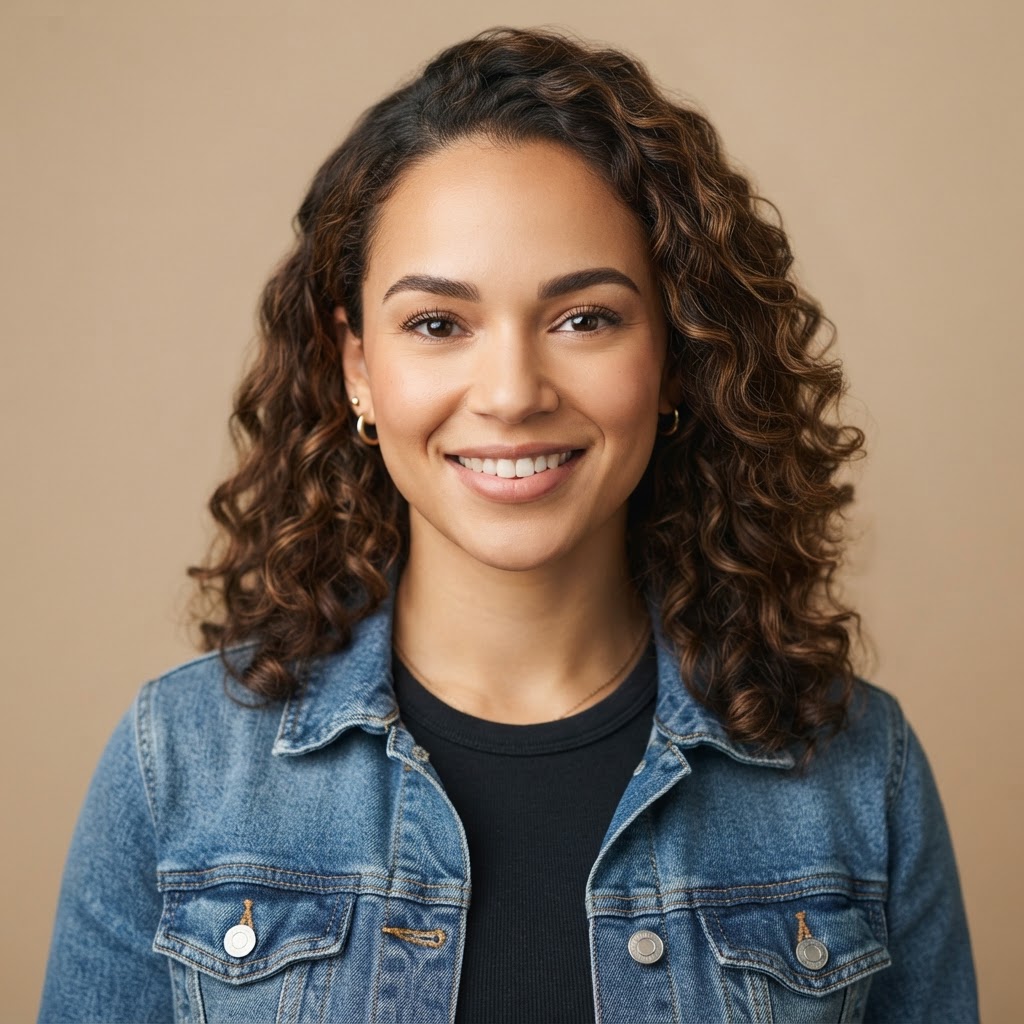
Mid-20s · denim jacket

Mid-30s · polo
Head & shoulders, centered
Notice the even lighting, neutral background, and direct eye contact — the same uniform style across every holder, whatever your background. That consistency is the fastest way to earn a creator's trust.
Shot with your phone — settings that work
Any modern phone camera is plenty. Use these settings and you'll get a crisp, professional-looking headshot.
Avoid overhead lights and direct sun.
Keep the phone at eye level, not below.
Sand, grey, or white tones match the marketplace.
Tap to focus on your face before shooting.
Leave a small even margin around your head.
JPG or PNG, sharp and in focus.
Frame it like a headshot
Center your head and shoulders in the frame. The top of your head to mid-chest should fill the photo. Leave a small, even margin around your head.
Use soft, even lighting
Face a window or a soft light source. Avoid harsh direct sun, overhead lights, or strong shadows across your face. Natural daylight is best.
Look at the lens, natural smile
Make eye contact with the camera and keep a relaxed, friendly expression. No selfies from below — hold the phone at eye level or slightly above.
Keep the background clean
Use a plain wall, neutral backdrop, or uncluttered outdoor scene. Solid muted tones (sand, grey, white) match the marketplace look best.
Do
- Use a square or near-square photo, at least 400×400 px
- Wear a simple, solid-color top
- Take the photo in daylight with a neutral background
- Look directly at the camera with a natural smile
- Make sure your face is sharp and in focus
Don't
- Sunglasses, hats, or filters that hide your face
- Group photos or cropped-from-a-crowd shots
- Busy, cluttered, or branded backgrounds
- Dark, blurry, or low-resolution images
- Selfie mirrors or extreme angles from below
File requirements
Format
JPG or PNG
Minimum size
400 × 400 px
Shape
Square
How to upload yours
- 1Open your Holder Dashboard and go to your Profile.
- 2Tap the profile photo circle at the top of the page.
- 3Choose a photo from your phone or computer that follows this guide.
- 4Crop it to a square, centered on your head and shoulders.
- 5Save — your new photo appears across the marketplace instantly.
Profile photos are reviewed to keep the marketplace uniform. Photos that don't meet these guidelines may be hidden until updated.